.png)

Introduction
When we onboard a new managed service customer, our first priority is deploying a comprehensive monitoring stack. Prometheus and Grafana form the backbone of our observability solution, giving us the flexibility and visibility we need.
At a minimum, our stack includes:
- Grafana – The central hub for all observability tools, complete with pre-loaded dashboards for quick insights.
- Prometheus – A widely adopted metrics collector with strong ecosystem support.
- Mimir – Paired with Prometheus, it provides a scalable and cost-effective model for long-term metrics storage.
- Loki – A cost-efficient log management solution that stores logs in inexpensive object storage.
- Tempo & OpenTelemetry – Essential for tracing and telemetry, enabling deep visibility into applications we build and run.
- Alloy – Once deployed, Alloy becomes the key to ingesting metrics, logs, and traces from servers and applications. Our wizard provides a ready-made Grafana Alloy configuration, so you can start collecting data immediately without manual setup.
Beyond Datadog: How to Create a Scalable, Cost-Effective Monitoring Solution | Digitalis Blog
AWS Virtual Machine
Some of these apps can be tedious to install and configure. I personally have an axe to grind about the amount of fiddling required to get the storage set up for Tempo, Mimir, and Loki and how the configuration options are slightly different between all of them😤
To make things easier, we’ve created a pre-configured AMI that comes with all the necessary software already installed and almost ready to use. Simply launch the wizard to complete the final setup.
Installation
The installation is quite simple. We recommend you use automation for the provisioning but you can also do it manually if that is your preference.
Manual Installation
Login to your AWS account and find us in the marketplace. You can also use the link below:
AWS Marketplace: Digitalis.IO Monitoring Stack
If you want to store your metrics and logs in S3 (very much recommended) you’ll need to create the buckets beforehand for loki, mimir and tempo and attach and role to the virtual machine granting it access to read and write from it.
You can find a role example in GitHub - digitalis-io/ami-monitoring: Cloudformation and Terraform code to deploy the Digitalis.IO monitoring VM
Cloudformation
A much simpler way is to use Cloudformation. You just need to click here and follow the on-screen instructions. Most of the values are optional.
You can find the code for this cloudformation stack along with instructions in our github repo:
ami-monitoring/cloudformation at main · digitalis-io/ami-monitoring
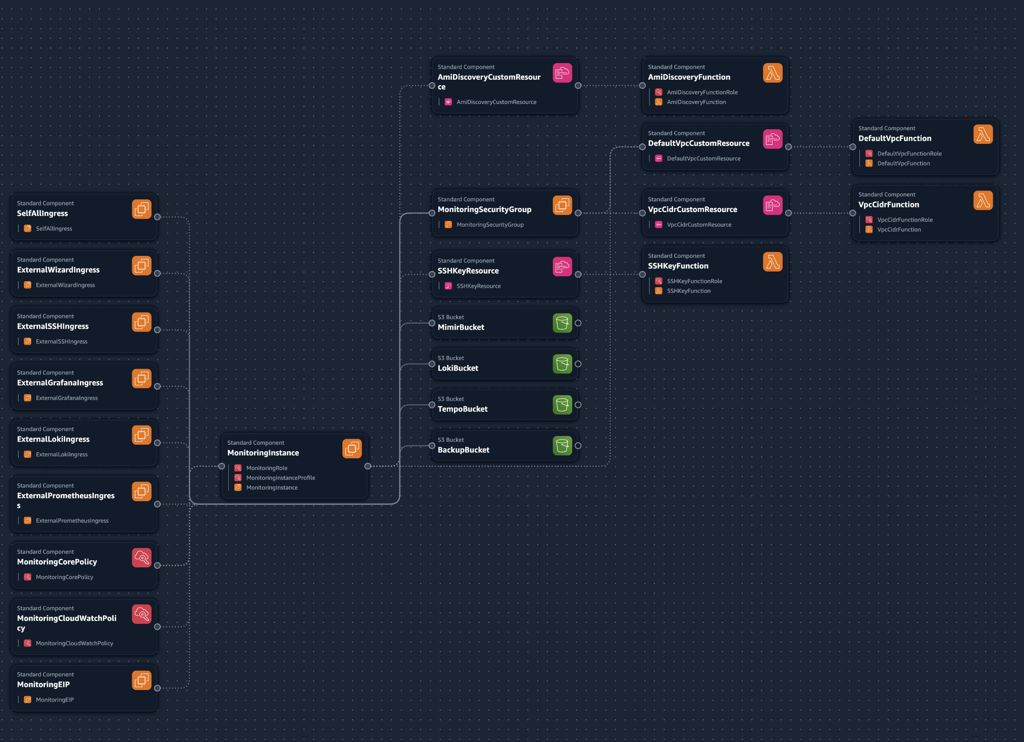
Terraform
This is my preferred method. Similarly to cloudformation, the provisioning code can create the EC2 instance as well as anything else required like the S3 buckets. Just follow the instructions in the github repository:
ami-monitoring/terraform/aws at main · digitalis-io/ami-monitoring
Wizard
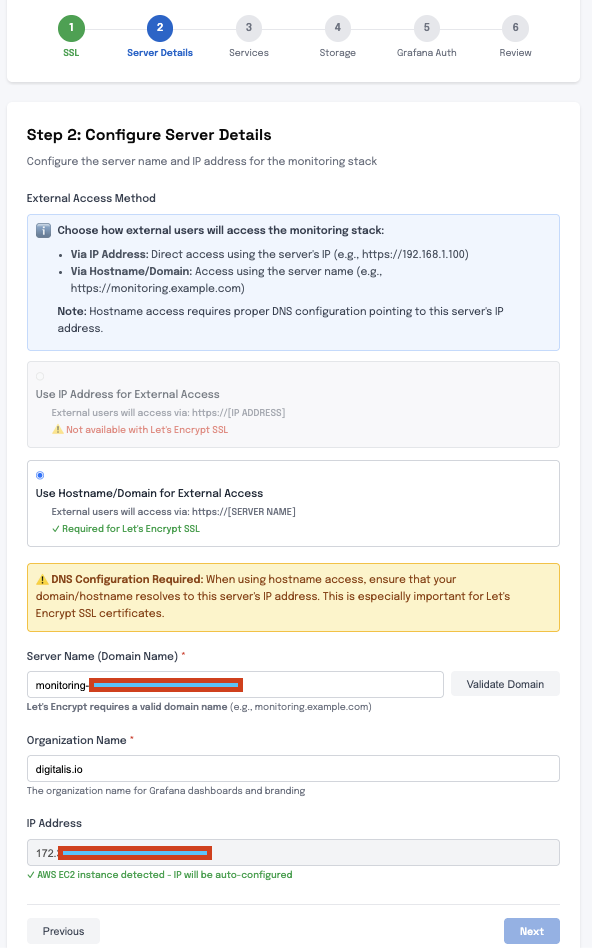
Once you have deployed the instance, open up the Wizard browsing to https://<instance-ip>:9443 to complete the installation. The video below shows you the process.
Conclusion
We built the Digitalis Monitoring Stack AMI because we were tired of the complex, costly, and tedious setup required for modern observability. We know the pain of configuring Mimir, Loki, and Tempo individually. Our solution delivers full observability in a single VM to eliminate that friction. This setup is cost-effective, scales efficiently using S3 storage, and uses our guided wizard for instant deployment, giving a unified, high-performance alternative to expensive, vendor-locked platforms.
This AMI is perfect for smaller environments, proofs-of-concept, or development. For large, HA deployments, our IaC templates can be adapted to deploy in a multi-node cluster, migrating seamlessly from the single VM setup.
There is, of course, a free trial available to you -Try it out free for 5 days - just make sure to cancel if you do not want to get charged as the free trial gets automatically converted to a paid subscription when the trial ends, but may be canceled any time before that.