.png)

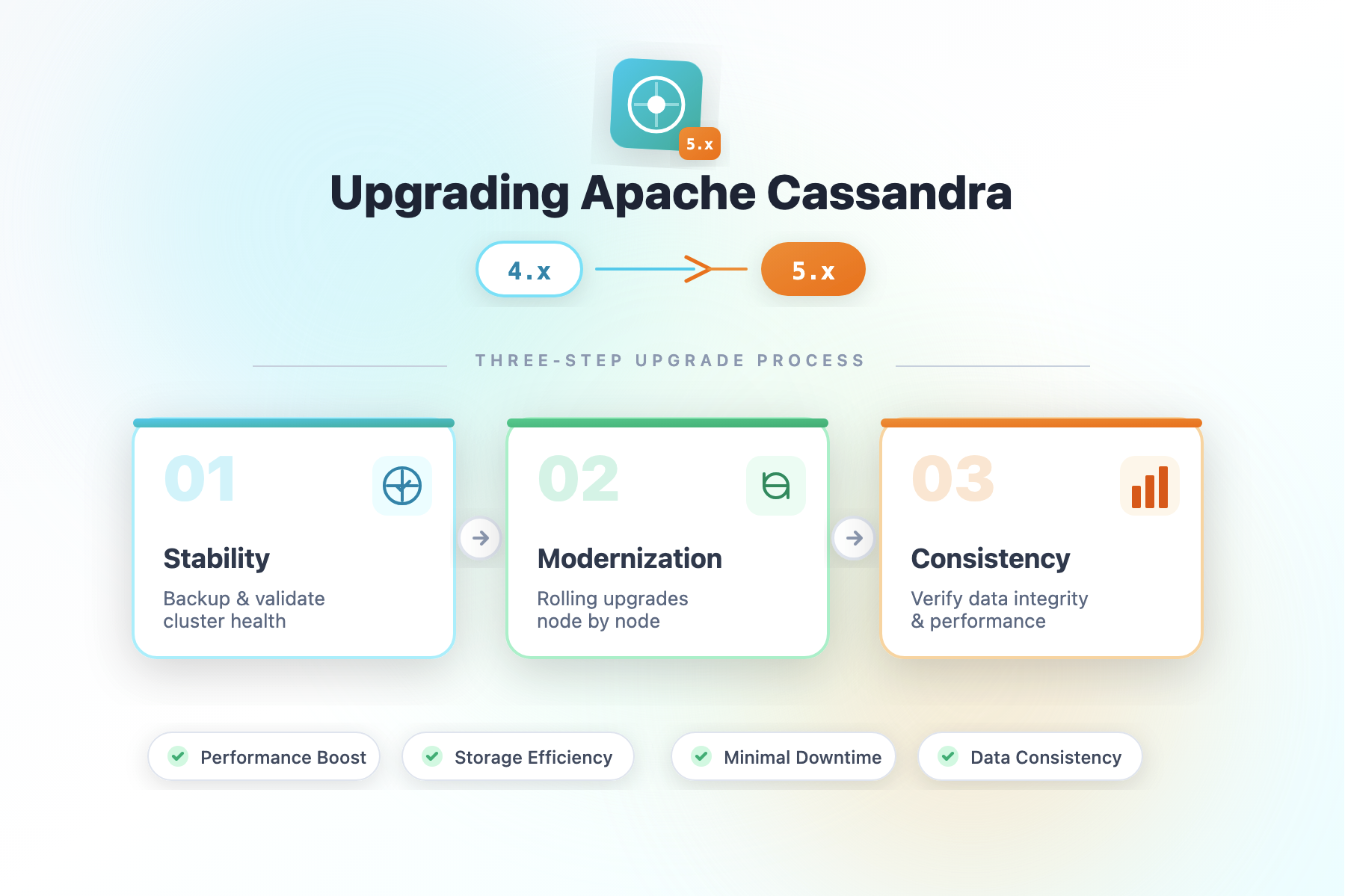
Upgrading Apache Cassandra is a critical operation that requires careful planning and execution. The transition from Cassandra 4.x to 5.x introduces significant improvements in performance and storage efficiency, but it demands a methodical approach to ensure data consistency and minimize downtime. This guide walks you through the recommended three-step upgrade process that balances stability with modernization.
Why Upgrade to Cassandra 5.x?
Cassandra 5.x brings substantial enhancements including improved query performance, better resource utilization, and support for modern storage formats. However, the path from 4.x to 5.x is not a simple version bump—it requires understanding and respecting the compatibility layers that protect your data during the transition.
The Three-Step Upgrade Process
The upgrade strategy is designed around storage compatibility modes and SSTable format transitions. Each step serves a specific purpose: ensuring backward compatibility, enabling gradual migration, and finally optimizing your deployment for modern Cassandra 5.x capabilities.
Step 1: Initial Upgrade to 5.0.x with CASSANDRA_4 Compatibility Mode
Configuration:
yaml
storage_compatibility_mode: CASSANDRA_4

sstables:
  selected_format: big
What happens in Step 1:
The first step is about safely bringing all your nodes up to Cassandra 5.0.x while maintaining complete backward compatibility with your existing 4.x data. During this phase, your cluster operates in a conservative mode that prioritises safety over optimisation.
When you set storage_compatibility_mode to CASSANDRA_4, you're telling Cassandra 5.x to maintain full compatibility with Cassandra 4.x data structures and behaviours. The BIG SSTable format is the traditional format used by Cassandra 4.x, so continuing with this format ensures that old SSTables can be read without transformation.
Timeline: This step should last until all nodes in your cluster are running Cassandra 5.0.x. You're essentially performing a rolling upgrade where you replace each Cassandra 4.x node with Cassandra 5.0.x, one node at a time, allowing the cluster to rebalance and repair before moving to the next node.
Risk Profile: Minimal. You're leveraging Cassandra's mature compatibility layer that has been battle-tested across multiple upgrade cycles.
Step 2: Enable Upgrade Compatibility Mode with Format Transition Preparation
Configuration:
yaml
storage_compatibility_mode: UPGRADING

sstables:
  selected_format: big

column_index_size: 16KiB
What happens in Step 2:
Once all nodes are running Cassandra 5.0.x and your cluster has stabilised, you transition into the UPGRADING mode. This is the bridge between old and new—a specially designed state where Cassandra can begin preparing for the newer BTI (Bi-level Temporal Index) SSTable format while still maintaining operational compatibility.
In Step 2, you keep the SSTable format as BIG, but you've moved into a state where Cassandra understands it's in the middle of an upgrade. This allows internal processes to prepare for the format migration without actively converting all your data yet.
The column_index_size parameter becomes important here. Setting it to 16KiB enables new indexing capabilities that are optimised for the BTI format, preparing your cluster for the final transition. This configuration improves column-level indexing efficiency and can reduce memory footprint for index operations.
Duration: Wait until your cluster is completely stable in this mode. Monitor for any anomalies in query performance, compaction operations, and resource utilisation. This typically takes days to weeks depending on your cluster size and workload.
What's changing behind the scenes: Cassandra is gradually rewiring how it handles SSTables. New SSTables created during this phase may be written in a format that's easier to convert to BTI, and the cluster is building metadata necessary for the format transition.
Step 3: Final Optimisation with BTI Format
Configuration:
yaml
storage_compatibility_mode: NONE

sstables:
  selected_format: bti

  column_index_size: 16KiB
What happens in Step 3:
This is the final step where you fully embrace Cassandra 5.x. Setting storage_compatibility_mode to NONE tells Cassandra that you're fully committed to 5.x and that there's no need to maintain backward compatibility with older versions. With selected_format set to bti, all newly compacted SSTables will use the modern BTI format.
Important: In Step 3, you have the flexibility to keep the selected format as BIG if you prefer. While BTI offers performance benefits, some operators choose to remain on BIG format for various reasons—perhaps due to operational preferences, third-party tooling compatibility, or specific workload characteristics. Both choices are valid and fully supported in Cassandra 5.x once you're in NONE compatibility mode.
Impact: At this point, your cluster is fully on Cassandra 5.x without any backward compatibility constraints. Compaction operations will create BTI SSTables (or continue with BIG if you choose), and you can leverage all modern performance optimisations.
Migration timeline: Complete SSTables migration doesn't happen overnight. Compaction gradually converts old BIG format SSTables to the new format. This is actually beneficial because it's non-disruptive—compaction happens in the background as part of normal operations.
Benefits of Following This Three-Step Approach
Reduced Risk and Operational Safety
The phased approach eliminates the danger of a monolithic upgrade where everything changes at once. If you encounter issues at any step, you have clear rollback points and can investigate problems in isolation. This is especially valuable in large clusters where coordinating across hundreds of nodes becomes complex.
Zero or Minimal Downtime
Because each step operates safely and is fully backward compatible, you never need to take the entire cluster offline. Rolling restarts with careful monitoring allow your application to continue serving requests throughout the upgrade process. For many deployments, this upgrade can be nearly transparent to end users.
Gradual Data Format Migration
The three-step process means your data format transition is spread out over time. Rather than all SSTables being rewritten simultaneously (which would cause massive I/O and compaction overhead), the format migration happens gradually as natural compaction occurs. This prevents the resource spikes that could degrade performance for your application.
Validation at Each Stage
Each step gives you time to validate that your cluster is functioning correctly before proceeding to the next phase. You can run comprehensive benchmarks, verify query performance, and ensure replication integrity before making the next commitment. This staged validation approach catches problems early when they're easier to address.
Flexibility and Optionality
The three-step process gives you choice. At Step 3, you're not locked into BTI format—you can choose to remain on BIG format if that better suits your needs. This flexibility acknowledges that different deployments have different requirements and that one size doesn't fit all.
Time for Operational Learning
Running Cassandra 5.x for days or weeks in CASSANDRA_4 mode before transitioning gives your ops team time to familiarise themselves with the new version. New metrics, new monitoring considerations, and new operational behaviours can be learned without time pressure.
Compliance and Auditability
For organisations that require documented upgrade procedures and audit trails, the three-step process provides clear checkpoints and configuration changes that can be logged and verified. Each step has a specific business purpose and measurable completion criteria.
Accelerating SSTable Migration with nodetool upgradesstables
While natural compaction will eventually convert all SSTables to your target format, there are scenarios where you may want to accelerate this process. Cassandra provides the nodetool upgradesstables command to actively rewrite SSTables to the target format.
What is nodetool upgradesstables?
The nodetool upgradesstables command forces Cassandra to rewrite SSTables in the selected format, regardless of when they were last written. This is useful when you want to ensure all SSTables are in your target format sooner rather than waiting for natural compaction.
Basic usage:
bash
# Upgrade all SSTables on a node to the target format
nodetool upgradesstables

# Upgrade SSTables for a specific keyspace
nodetool upgradesstables keyspace_name

# Upgrade SSTables for specific tables
nodetool upgradesstables keyspace_name table1 table2

# Check current status with -a flag (all keyspaces)
nodetool upgradesstables -a
Benefits of Running upgradesstables
Faster Format Standardization
By running nodetool upgradesstables after transitioning to Step 3 (NONE mode with BTI or BIG format), you can ensure all SSTables across your cluster are in the new format within days instead of weeks or months. This provides consistent performance characteristics across all data, as old format SSTables may have different performance profiles than newly written ones.
Uniform Performance
When all SSTables are in the same format, query performance becomes more predictable and consistent. Old BIG format SSTables might have different indexing characteristics than new ones, leading to variable latency. Upgrading all SSTables ensures uniform read performance across your entire dataset.
Memory Efficiency Gains (especially for BTI)
If you're migrating to BTI format, running upgradesstables accelerates the memory benefits. BTI format uses 10-30% less memory for indexes, so converting all your old BIG format SSTables to BTI means you can realize these memory savings cluster-wide, reducing GC pressure sooner and improving overall cluster stability.
Operational Predictability
Having all SSTables in a single format simplifies operations. Monitoring tools, backup procedures, and disaster recovery workflows can rely on consistent SSTable structure. This reduces operational complexity and makes cluster maintenance more straightforward.
Faster Reads for Newly Accessed Data
After upgradesstables completes, any newly compacted or accessed data will be in the new format. For clusters with hot data patterns, this can result in noticeable performance improvements within days of the upgrade command.
When to Run upgradesstables
Run upgradesstables if:
- You want to ensure all SSTables are in the target format quickly
- You're migrating to BTI and want to capture memory efficiency gains immediately
- You're in Step 3 (NONE compatibility mode) and want to finalize the migration
- Your cluster has significant read-heavy workloads that would benefit from format optimization
- You have planned maintenance windows where increased compaction activity is acceptable
Wait for natural compaction if:
- Your cluster is already heavily loaded with write operations
- You don't have available disk space for compaction overhead
- You prefer minimal background I/O impact on production workloads
- Your cluster has very large SSTables that would take a long time to rewrite
- You're running in a resource-constrained environment
Important Considerations
Disk Space Requirements
nodetool upgradesstables rewrites SSTables, which temporarily doubles disk space usage for the data being rewritten. During the upgrade, you'll need approximately 2x the size of your SSTables available on disk. If disk space is constrained, run the command during off-peak hours or on a per-keyspace basis to manage space usage.
I/O Impact
Running upgradesstables will increase disk I/O and CPU utilization as compaction activities intensify. On production clusters, this can temporarily impact query performance. Run the command during maintenance windows or when you have capacity headroom to absorb the additional load.
Node-by-Node Execution
For a rolling upgrade, run nodetool upgradesstables on each node sequentially rather than simultaneously to minimize cluster-wide performance impact. Allow each node to complete before moving to the next. This typically takes hours to days depending on SSTable size and disk I/O capacity.
Recommended Workflow
- All nodes reach Step 3 (storage_compatibility_mode: NONE)
- Wait 24-48 hours for cluster stability
- Run
nodetool upgradesstableson the first node during a maintenance window - Monitor performance and disk usage
- Once the first node completes, proceed to the next node
- Repeat across all nodes in the cluster
Understanding SSTable Formats: BTI vs BIG
To appreciate what's happening during this upgrade, it's important to understand the fundamental differences between the BIG and BTI SSTable formats.
BIG Format (Traditional)
The BIG format is the established, production-proven SSTable format used throughout Cassandra's maturity. "BIG" refers to the fact that it uses big-endian byte ordering and represents a balanced design for general-purpose workloads.
Characteristics of BIG format:
- Mature and stable: It has been refined over many years and is extremely well-understood
- Straightforward index structure: Uses a relatively simple index that works well for random access patterns
- Predictable performance: Performance characteristics are well-documented and consistent
- Broad compatibility: Works seamlessly with older Cassandra versions and third-party tools
- Larger index footprint: The index can consume more memory for very large SSTables
- Full-key indexing: Every partition key is indexed in the sparse index
Performance profile:
The BIG format is optimised for reliability and consistency across diverse workloads. It performs admirably for most use cases and has proven itself in production environments worldwide. For many organisations, staying with BIG format even in Cassandra 5.x is a perfectly reasonable choice.
BTI Format (Modern)
BTI (Bi-level Temporal Index) is the new format introduced in Cassandra 5.x. It represents a rethinking of how SSTable indexes should be structured in modern systems with large storage datasets.
Characteristics of BTI format:
- Two-level index structure: Uses a primary index and a secondary index layer, enabling more efficient lookups
- Temporal awareness: Understands the timestamp distribution of data, which helps optimise seeks
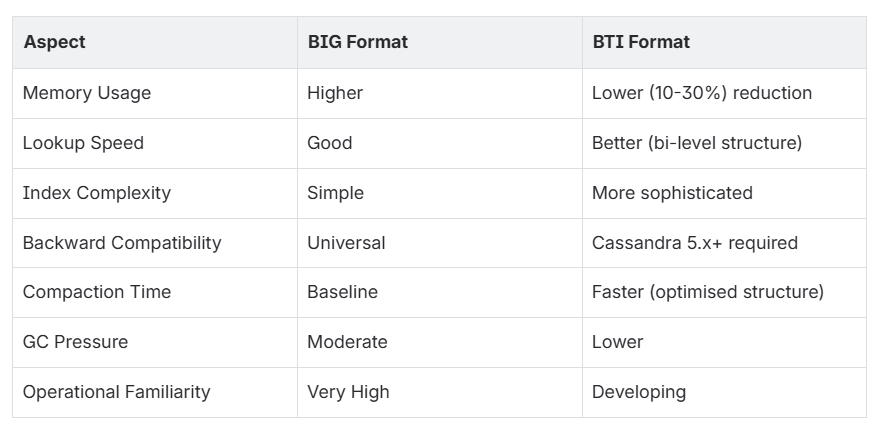
- Reduced index size: Typically uses 10-30% less memory for the same SSTable
- Optimised for large datasets: Particularly effective for clusters with many large SSTables
- Better clustering: Spatial locality in index structure improves cache efficiency
- Adaptive indexing: Can adjust index density based on data distribution
Performance characteristics:
- Faster seeks: Bi-level structure means fewer index lookups to find data
- Lower memory pressure: Smaller index means less GC pressure and lower heap requirements
- Better I/O patterns: Index organisation reduces unnecessary disk accesses
- Improved compaction efficiency: Format is designed with modern compaction strategies in mind
Practical Differences for Operations
When to Choose Each Format
Keep BIG format if:
- Your cluster is performing well and you want to minimise operational change
- You have third-party tools that depend on BIG format
- You're cautious about adopting newer technologies
- Your workload doesn't require the specific optimisations BTI provides
- You're in a highly regulated environment that prefers proven technologies
Migrate to BTI format if:
- You're experiencing memory pressure or GC issues related to index sizes
- You have very large clusters with many SSTables
- You want to take advantage of Cassandra 5.x specific optimisations
- Your infrastructure has room for experimentation and learning
- You're planning to stay on Cassandra 5.x for several years
- Important: If choosing BTI, upgrade to Cassandra 5.0.6 or later for critical stability and correctness improvements
Version-Specific Considerations: Cassandra 5.0.6 and BTI Format
If you're planning to adopt the BTI SSTable format as part of your upgrade to Cassandra 5.x, it's important to understand a critical fix introduced in Cassandra 5.0.6.
The Range Query Fix (CASSANDRA-20976)
Cassandra 5.0.5 and earlier versions contained a bug that affected range queries on BTI-formatted SSTables when files were opened early. This issue could lead to incomplete or incorrect query results when executing range queries against tables using the BTI format.
What was the issue?
When BTI SSTables were opened early (before completing their write cycle), subsequent range queries could miss data or return inconsistent results. This is a critical issue for any production deployment relying on BTI format, especially for workloads with significant range query operations.
How was it fixed?
Cassandra 5.0.6 resolved this issue with the fix for CASSANDRA-20976, ensuring that range queries execute correctly and consistently on all BTI files, regardless of when they were opened or their write state.
Recommendation: Use Cassandra 5.0.6 or Later for BTI
If you're planning to migrate to BTI format, we strongly recommend upgrading to Cassandra 5.0.6 or later. This ensures you have the range query fix and avoid potential data inconsistencies.
Your upgrade path if targeting BTI:
- Upgrade to Cassandra 5.0.6+ (or later 5.x versions)
- Follow the three-step upgrade process (Steps 1, 2, and 3)
- In Step 3, set
sstables.selected_format: bti - Run
nodetool upgradesstableswith confidence, knowing range queries will work correctly
If you're staying with BIG format:
- Any 5.0.x version is acceptable
- The fix doesn't impact BIG format operations
- You have more flexibility in your version selection
Why This Matters for Your Production Environment
This fix is particularly important if your workload includes:
- Time-series data with frequent range queries
- Range scans in your application queries
- Reporting or analytics queries that span multiple rows
- Any use of
>=,<=, orBETWEENoperators in your queries
For these use cases, Cassandra 5.0.6+ provides the confidence that your data queries are accurate and complete.
Monitoring During the Upgrade
Key metrics to watch throughout all three steps:
Cluster Health:
- Pending compactions (should decrease or stabilise)
- Read/write latency (shouldn't increase, decrease is ideal)
- Disk space usage (monitor compaction impact)
Replication:
- Pending repairs
- Node UP/DOWN status
- Replication factor consistency
Performance:
- Query response times
- Throughput (ops/sec)
- CPU and memory utilisation
Conclusion
The three-step upgrade process from Cassandra 4.x to 5.x is a thoughtfully designed path that prioritises safety without sacrificing progress. By following this approach, you gain access to modern Cassandra 5.x capabilities while maintaining precise control over the transition timeline and impact.
The choice between BTI and BIG formats in Step 3 is ultimately yours—both are fully supported and optimised in Cassandra 5.x. Whether you embrace the newer BTI format for its efficiency gains or stick with the proven BIG format, you'll be in a strong position with a fully upgraded cluster.
Remember that upgrade planning should account for your specific cluster characteristics, workload patterns, and organisational risk tolerance. This guide provides the recommended path, but your deployment may have unique considerations that warrant consulting with your operations team or Cassandra specialists.
Take your time with each step, monitor carefully, and you'll successfully modernise your Cassandra infrastructure with minimal risk and maximum stability.
Need Expert Guidance?
Still struggling with your Cassandra upgrade? Don't navigate this complex migration alone. Whether you're facing deployment challenges, need performance optimisation advice, or want a second opinion on your upgrade strategy, we're here to help.
Our team of Cassandra experts can assist you with:
- Pre-upgrade planning and risk assessment
- Cluster configuration optimisation
- Monitoring and performance tuning
- Post-upgrade validation and testing
- Custom migration strategies for your specific infrastructure
Let's Make Your Transition Easy
Upgrading to Cassandra 5.x doesn't have to be stressful. With the right guidance and support, you can modernise your database infrastructure with confidence. Reach out to us today and let our specialists guide you through every step of the process.
Contact Us – Digitalis – we're ready to ensure your Cassandra upgrade is smooth, secure, and successful.