A no-nonsense guide for engineers choosing a streaming broker in 2026
Every streaming project starts with the same question: Kafka, Pulsar, RabbitMQ, or NATS? The internet gives you opinion pieces. Here’s another one for you but this post gives you the engineering trade-offs, the Docker Compose to spin each one up in five minutes, and real Java client code. This gives you enough to try each technology and make the decision with your hands, not just your head.
We have created a Github repository of all of the code samples and Docker scripts. You can build, run and observe each streaming technology. The producer and consumers are fully functional so you can see how they work. Within the blog post we have kept the general outlines for Docker and the Java code (using Java 17 as a baseline), the repository gives you a fully working demonstration. There is a full README to show you how to get up and running.
TL;DR Decision Matrix


Apache Kafka , The Append-Only Event Log
USP
Kafka's defining characteristic is its immutable, partitioned commit log. Messages are not deleted on consumption , they sit on disk until a retention policy expires them. Every consumer group maintains its own offset, meaning:
- Multiple independent consumers read the same events without coordination.
- You can replay history to rebuild projections or debug issues.
- Ordered processing within a partition is guaranteed.
Kafka excels at high-throughput, durable event streaming where the log is the source of truth , think CDC (Change Data Capture), event sourcing, CQRS read-model rebuilds, and real-time analytics pipelines feeding Flink or Spark.
What it's not: A traditional message queue. If you need per-message routing with complex predicates, fanout to thousands of dynamic queues, or sub-millisecond latency at modest scale, Kafka is overkill.
Quick Try-It-Out (Docker Compose)
yaml
1# docker-compose-kafka.yml
2version: "3.9"
3services:
4  kafka:
5    image: apache/kafka:3.9.0
6    container_name: kafka
7    ports:
8      - "9092:9092"
9    environment:
10      KAFKA_NODE_ID: 1
11      KAFKA_PROCESS_ROLES: broker,controller
12      KAFKA_LISTENERS: PLAINTEXT://:9092,CONTROLLER://:9093
13      KAFKA_ADVERTISED_LISTENERS: PLAINTEXT://localhost:9092
14      KAFKA_CONTROLLER_QUORUM_VOTERS: 1@kafka:9093
15      KAFKA_CONTROLLER_LISTENER_NAMES: CONTROLLER
16      KAFKA_OFFSETS_TOPIC_REPLICATION_FACTOR: 1
17      KAFKA_LOG_DIRS: /var/lib/kafka/data
18      CLUSTER_ID: "MkU3OEVBNTcwNTJENDM2Qg"
19    volumes:
20      - kafka_data:/var/lib/kafka/data
21
22  kafka-ui:
23    image: provectuslabs/kafka-ui:latest
24    container_name: kafka-ui
25    ports:
26      - "8080:8080"
27    environment:
28      KAFKA_CLUSTERS_0_NAME: local
29      KAFKA_CLUSTERS_0_BOOTSTRAPSERVERS: kafka:9092
30    depends_on:
31      - kafka
32
33volumes:
34  kafka_data:
bash
1docker compose -f docker-compose-kafka.yml up -d
2# UI available at http://localhost:8080
3# Create a topic
4docker exec kafka /opt/kafka/bin/kafka-topics.sh \
5  --create --topic orders --partitions 3 \
6  --replication-factor 1 \
7  --bootstrap-server localhost:9092
Java Client Example
pom.xml dependency:
xml
1<dependency>
2    <groupId>org.apache.kafka</groupId>
3    <artifactId>kafka-clients</artifactId>
4    <version>3.9.0</version>
5</dependency>
Producer:
java
1import org.apache.kafka.clients.producer.*;
2import org.apache.kafka.common.serialization.StringSerializer;
3import java.util.Properties;
4import java.util.concurrent.Future;
5
6public class OrderProducer {
7
8    public static void main(String[] args) throws Exception {
9        Properties props = new Properties();
10        props.put(ProducerConfig.BOOTSTRAP_SERVERS_CONFIG, "localhost:9092");
11        props.put(ProducerConfig.KEY_SERIALIZER_CLASS_CONFIG, StringSerializer.class.getName());
12        props.put(ProducerConfig.VALUE_SERIALIZER_CLASS_CONFIG, StringSerializer.class.getName());
13
14        // Durability vs latency trade-off ,  "all" waits for all ISR replicas
15        props.put(ProducerConfig.ACKS_CONFIG, "all");
16
17        // Idempotent producer: exactly-once semantics at the producer level
18        props.put(ProducerConfig.ENABLE_IDEMPOTENCE_CONFIG, true);
19
20        // Batching for throughput
21        props.put(ProducerConfig.LINGER_MS_CONFIG, 5);
22        props.put(ProducerConfig.BATCH_SIZE_CONFIG, 32 * 1024);
23
24        try (KafkaProducer<String, String> producer = new KafkaProducer<>(props)) {
25            for (int i = 0; i < 10; i++) {
26                String orderId = "order-" + i;
27                String payload = """
28                    {"orderId":"%s","item":"widget","qty":%d}
29                    """.formatted(orderId, i + 1);
30
31                ProducerRecord<String, String> record =
32                    new ProducerRecord<>("orders", orderId, payload);
33
34                // Async send with callback
35                producer.send(record, (metadata, ex) -> {
36                    if (ex != null) {
37                        System.err.println("Send failed: " + ex.getMessage());
38                    } else {
39                        System.out.printf("Sent to partition=%d offset=%d%n",
40                            metadata.partition(), metadata.offset());
41                    }
42                });
43            }
44            producer.flush();
45        }
46    }
47}
Consumer (with manual offset commit for exactly-once processing):
java
1import org.apache.kafka.clients.consumer.*;
2import org.apache.kafka.common.serialization.StringDeserializer;
3import java.time.Duration;
4import java.util.*;
5
6public class OrderConsumer {
7
8    public static void main(String[] args) {
9        Properties props = new Properties();
10        props.put(ConsumerConfig.BOOTSTRAP_SERVERS_CONFIG, "localhost:9092");
11        props.put(ConsumerConfig.GROUP_ID_CONFIG, "order-processor-v1");
12        props.put(ConsumerConfig.KEY_DESERIALIZER_CLASS_CONFIG, StringDeserializer.class.getName());
13        props.put(ConsumerConfig.VALUE_DESERIALIZER_CLASS_CONFIG, StringDeserializer.class.getName());
14
15        // Disable auto-commit ,  we commit AFTER successful processing
16        props.put(ConsumerConfig.ENABLE_AUTO_COMMIT_CONFIG, false);
17
18        // Read from the beginning if no committed offset exists
19        props.put(ConsumerConfig.AUTO_OFFSET_RESET_CONFIG, "earliest");
20
21        try (KafkaConsumer<String, String> consumer = new KafkaConsumer<>(props)) {
22            consumer.subscribe(List.of("orders"));
23
24            while (true) {
25                ConsumerRecords<String, String> records =
26                    consumer.poll(Duration.ofMillis(500));
27
28                for (ConsumerRecord<String, String> record : records) {
29                    System.out.printf(
30                        "[partition=%d offset=%d key=%s] %s%n",
31                        record.partition(), record.offset(),
32                        record.key(), record.value()
33                    );
34
35                    // Process message... if this throws, we don't commit
36                    processOrder(record.value());
37                }
38
39                // Synchronous commit after processing the whole batch
40                if (!records.isEmpty()) {
41                    consumer.commitSync();
42                }
43            }
44        }
45    }
46
47    private static void processOrder(String payload) {
48        // Business logic here
49        System.out.println("Processing: " + payload);
50    }
51}
Key Kafka patterns to know:
- Consumer groups scale horizontally , add consumers up to the number of partitions.
- Partition key determines ordering. Same
orderIdkey → same partition → strict order. - To replay from a specific point:
consumer.seek(partition, offset)before polling.

Apache Pulsar , The Geo-Native Unified Messaging Platform
USP
Pulsar separates compute (brokers) from storage (BookKeeper). This seemingly simple architectural decision has profound implications:
- Instant broker failover , a new broker picks up a topic immediately with no data locality constraint.
- Native tiered storage , topics automatically offload cold segments to S3/GCS/ADLS, making infinite retention economically viable.
- Topic-level geo-replication , configure per-topic replication policies across regions declaratively.
- Unified API , a single topic can serve both streaming consumers (like Kafka) and queue consumers (competing consumers with ACKs) simultaneously. No need to run two brokers.
Pulsar's multi-tenancy model (tenant/namespace/topic) makes it ideal for platform teams building internal messaging infrastructure for multiple product teams, each with their own quotas, retention policies, and auth.
What it's not: Simple to operate. Pulsar's dependency on ZooKeeper (or its oxia replacement) and BookKeeper means more moving parts. For a small team running a single application, this overhead rarely pays off.
Quick Try-It-Out (Docker Compose)
yaml
1# docker-compose-pulsar.yml
2version: "3.9"
3services:
4  pulsar:
5    image: apachepulsar/pulsar:3.3.4
6    container_name: pulsar
7    command: bin/pulsar standalone
8    ports:
9      - "6650:6650"   # Pulsar binary protocol
10      - "8081:8080"   # Admin REST API / UI
11    environment:
12      PULSAR_MEM: "-Xms512m -Xmx512m -XX:MaxDirectMemorySize=256m"
13    volumes:
14      - pulsar_data:/pulsar/data
15      - pulsar_conf:/pulsar/conf
16
17volumes:
18  pulsar_data:
19  pulsar_conf:
bash
1docker compose -f docker-compose-pulsar.yml up -d
2
3# Create a tenant, namespace, and topic
4docker exec pulsar bin/pulsar-admin tenants create my-org
5docker exec pulsar bin/pulsar-admin namespaces create my-org/orders
6docker exec pulsar bin/pulsar-admin topics create \
7  persistent://my-org/orders/placed
8
9# Admin UI at http://localhost:8081
Java Client Example
pom.xml dependency:
xml
1<dependency>
2    <groupId>org.apache.pulsar</groupId>
3    <artifactId>pulsar-client</artifactId>
4    <version>3.3.4</version>
5</dependency>
Producer:
java
1import org.apache.pulsar.client.api.*;
2import java.util.concurrent.CompletableFuture;
3
4public class PulsarOrderProducer {
5
6    private static final String SERVICE_URL = "pulsar://localhost:6650";
7    private static final String TOPIC = "persistent://my-org/orders/placed";
8
9    public static void main(String[] args) throws Exception {
10        PulsarClient client = PulsarClient.builder()
11            .serviceUrl(SERVICE_URL)
12            .build();
13
14        Producer<byte[]> producer = client.newProducer()
15            .topic(TOPIC)
16            // Batching: buffer messages and flush as a single chunk
17            .enableBatching(true)
18            .batchingMaxMessages(100)
19            .batchingMaxPublishDelay(5, java.util.concurrent.TimeUnit.MILLISECONDS)
20            // Compression
21            .compressionType(CompressionType.LZ4)
22            .create();
23
24        for (int i = 0; i < 10; i++) {
25            String payload = """
26                {"orderId":"order-%d","item":"gadget","qty":%d}
27                """.formatted(i, i + 1);
28
29            // Pulsar supports rich message metadata natively
30            CompletableFuture<MessageId> future = producer.newMessage()
31                .key("order-" + i)                        // routing/partition key
32                .property("source", "checkout-service")   // custom properties
33                .property("version", "2")
34                .value(payload.getBytes())
35                .sendAsync();
36
37            future.thenAccept(msgId ->
38                System.out.println("Published with id: " + msgId)
39            );
40        }
41
42        producer.flushAsync().join();
43        producer.close();
44        client.close();
45    }
46}
Consumer , Exclusive subscription (streaming mode):
java
1import org.apache.pulsar.client.api.*;
2
3public class PulsarOrderConsumer {
4
5    private static final String SERVICE_URL = "pulsar://localhost:6650";
6    private static final String TOPIC = "persistent://my-org/orders/placed";
7
8    public static void main(String[] args) throws Exception {
9        PulsarClient client = PulsarClient.builder()
10            .serviceUrl(SERVICE_URL)
11            .build();
12
13        // Subscription types:
14        //   Exclusive    ,  only one consumer (Kafka-like, strict order)
15        //   Shared       ,  competing consumers, round-robin (queue-like)
16        //   Failover     ,  active/standby
17        //   Key_Shared   ,  competing consumers but keyed ordering
18        Consumer<byte[]> consumer = client.newConsumer()
19            .topic(TOPIC)
20            .subscriptionName("order-processor-sub")
21            .subscriptionType(SubscriptionType.Key_Shared) // <-- unique to Pulsar
22            .subscriptionInitialPosition(SubscriptionInitialPosition.Earliest)
23            .ackTimeout(10, java.util.concurrent.TimeUnit.SECONDS)
24            .subscribe();
25
26        while (true) {
27            // Blocking receive with timeout
28            Message<byte[]> msg = consumer.receive(1, java.util.concurrent.TimeUnit.SECONDS);
29
30            if (msg == null) continue;
31
32            try {
33                String payload = new String(msg.getData());
34                String source = msg.getProperty("source");
35
36                System.out.printf("[key=%s source=%s] %s%n",
37                    msg.getKey(), source, payload);
38
39                processOrder(payload);
40
41                // Individual message ACK ,  Pulsar tracks each independently
42                consumer.acknowledge(msg);
43
44            } catch (Exception e) {
45                // Negative-ACK redelivers after a configurable delay
46                consumer.negativeAcknowledge(msg);
47                System.err.println("Processing failed, will redeliver: " + e.getMessage());
48            }
49        }
50    }
51
52    private static void processOrder(String payload) {
53        System.out.println("Processing: " + payload);
54    }
55}
Key Pulsar patterns to know:
Key_Sharedsubscription gives you Kafka-style per-key ordering with horizontal scaling , this is Pulsar's killer feature.- Dead letter topics are first-class:
.deadLetterPolicy(DeadLetterPolicy.builder().maxRedeliverCount(3).build()). - Tiered storage: once configured, old topic segments offload to cheap object storage automatically.

RabbitMQ , The Flexible Message Broker
USP
RabbitMQ's power is its exchange model and the AMQP protocol's expressive routing. Messages flow Producer → Exchange → Binding → Queue → Consumer. The exchange type determines how bindings route messages:
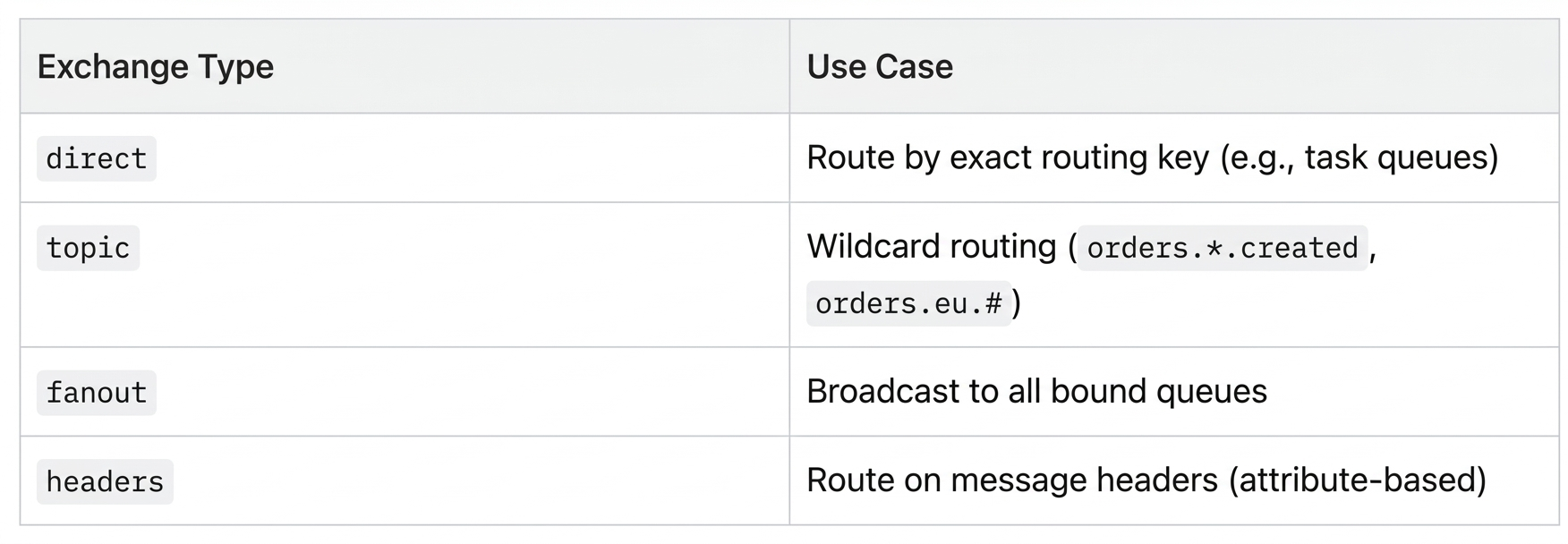
This makes RabbitMQ exceptional for complex routing topologies, RPC patterns, and task queues where messages should be processed once and then gone. The broker is the workhorse of service-to-service communication in microservice architectures.
RabbitMQ's Quorum Queues (its modern, Raft-replicated queue type) offer durable, exactly-once-delivery guarantees. Streams (added in 3.9) bring a Kafka-like replay log if you need it.
What it's not: A high-throughput event log. RabbitMQ is not designed for consumers replaying millions of historical events. For pure analytics pipelines or event sourcing, it's the wrong tool.
Quick Try-It-Out (Docker Compose)
yaml
1# docker-compose-rabbitmq.yml
2version: "3.9"
3services:
4  rabbitmq:
5    image: rabbitmq:3.13-management
6    container_name: rabbitmq
7    ports:
8      - "5672:5672"    # AMQP
9      - "15672:15672"  # Management UI
10    environment:
11      RABBITMQ_DEFAULT_USER: admin
12      RABBITMQ_DEFAULT_PASS: secret
13      RABBITMQ_DEFAULT_VHOST: /
14    volumes:
15      - rabbitmq_data:/var/lib/rabbitmq
16    healthcheck:
17      test: ["CMD", "rabbitmq-diagnostics", "-q", "ping"]
18      interval: 10s
19      timeout: 5s
20      retries: 5
21
22volumes:
23  rabbitmq_data:
bas
1docker compose -f docker-compose-rabbitmq.yml up -d
2# Management UI at http://localhost:15672  (admin / secret)
3
4# Declare a quorum queue via CLI
5docker exec rabbitmq rabbitmqctl eval '
6  {ok, Conn} = amqp_connection:start(#amqp_params_direct{}),
7  {ok, Ch} = amqp_channel:open(Conn),
8  amqp_channel:call(Ch, #'"'"'queue.declare'"'"'{
9    queue = <<"orders">>, durable = true,
10    arguments = [{<<"x-queue-type">>, longstr, <<"quorum">>}]
11  })
12.'
Java Client Example
pom.xml dependency:
xml
1<dependency>
2    <groupId>com.rabbitmq</groupId>
3    <artifactId>amqp-client</artifactId>
4    <version>5.21.0</version>
5</dependency>
Infrastructure setup (topology-as-code pattern):
java
1import com.rabbitmq.client.*;
2import java.util.Map;
3
4public class RabbitMQTopology {
5
6    public static final String EXCHANGE_NAME = "orders.exchange";
7    public static final String QUEUE_EU     = "orders.eu";
8    public static final String QUEUE_US     = "orders.us";
9    public static final String QUEUE_ALL    = "orders.all";
10
11    /**
12     * Declare a topic exchange and bind multiple queues with routing patterns.
13     * Run once on startup (declarations are idempotent).
14     */
15    public static void declare(Channel channel) throws Exception {
16        // Topic exchange: routing keys like "orders.eu.created", "orders.us.shipped"
17        channel.exchangeDeclare(EXCHANGE_NAME, BuiltinExchangeType.TOPIC, true);
18
19        // Quorum queues ,  Raft-replicated, durable, exactly-once delivery
20        Map<String, Object> quorumArgs = Map.of("x-queue-type", "quorum");
21
22        channel.queueDeclare(QUEUE_EU,  true, false, false, quorumArgs);
23        channel.queueDeclare(QUEUE_US,  true, false, false, quorumArgs);
24        channel.queueDeclare(QUEUE_ALL, true, false, false, quorumArgs);
25
26        // Bindings: queue ← routing-key-pattern ← exchange
27        channel.queueBind(QUEUE_EU,  EXCHANGE_NAME, "orders.eu.#");
28        channel.queueBind(QUEUE_US,  EXCHANGE_NAME, "orders.us.#");
29        channel.queueBind(QUEUE_ALL, EXCHANGE_NAME, "orders.#");   // catch-all
30    }
31}
Producer:
java
1import com.rabbitmq.client.*;
2
3public class RabbitMQOrderProducer {
4
5    public static void main(String[] args) throws Exception {
6        ConnectionFactory factory = new ConnectionFactory();
7        factory.setHost("localhost");
8        factory.setUsername("admin");
9        factory.setPassword("secret");
10
11        // Connection per application, Channel per thread
12        try (Connection conn = factory.newConnection();
13             Channel channel = conn.createChannel()) {
14
15            RabbitMQTopology.declare(channel);
16
17            // Publisher confirms ,  broker ACKs once written to quorum
18            channel.confirmSelect();
19
20            String[] regions = {"eu", "us"};
21            String[] events  = {"created", "shipped", "delivered"};
22
23            for (int i = 0; i < 9; i++) {
24                String region  = regions[i % 2];
25                String event   = events[i % 3];
26                String routingKey = "orders." + region + "." + event;
27
28                String body = """
29                    {"orderId":"order-%d","region":"%s","event":"%s"}
30                    """.formatted(i, region, event);
31
32                AMQP.BasicProperties props = new AMQP.BasicProperties.Builder()
33                    .contentType("application/json")
34                    .deliveryMode(2)          // 2 = persistent (survives restart)
35                    .messageId("msg-" + i)
36                    .build();
37
38                channel.basicPublish(
39                    RabbitMQTopology.EXCHANGE_NAME,
40                    routingKey,
41                    props,
42                    body.getBytes()
43                );
44
45                System.out.println("Sent [" + routingKey + "]: " + body.trim());
46            }
47
48            // Block until all published messages are confirmed by the broker
49            channel.waitForConfirmsOrDie(5000);
50            System.out.println("All messages confirmed.");
51        }
52    }
53}
Consumer (push-based with manual ACK):
java
1import com.rabbitmq.client.*;
2import java.io.IOException;
3import java.util.concurrent.CountDownLatch;
4
5public class RabbitMQOrderConsumer {
6
7    public static void main(String[] args) throws Exception {
8        ConnectionFactory factory = new ConnectionFactory();
9        factory.setHost("localhost");
10        factory.setUsername("admin");
11        factory.setPassword("secret");
12
13        Connection conn    = factory.newConnection();
14        Channel channel    = conn.createChannel();
15
16        RabbitMQTopology.declare(channel);
17
18        // Prefetch: broker sends at most N unACKed messages at a time
19        // Tune this for throughput vs memory trade-off
20        channel.basicQos(50);
21
22        System.out.println("Waiting for EU orders...");
23
24        DeliverCallback deliverCallback = (consumerTag, delivery) -> {
25            String body       = new String(delivery.getBody());
26            String routingKey = delivery.getEnvelope().getRoutingKey();
27            long deliveryTag  = delivery.getEnvelope().getDeliveryTag();
28
29            System.out.printf("[%s] %s%n", routingKey, body);
30
31            try {
32                processOrder(body);
33                // ACK: tell the broker this message is done
34                channel.basicAck(deliveryTag, false);
35            } catch (Exception e) {
36                System.err.println("Processing failed: " + e.getMessage());
37                // NACK + requeue=false → message goes to dead-letter exchange if configured
38                channel.basicNack(deliveryTag, false, false);
39            }
40        };
41
42        // autoAck=false ,  we control when messages are removed from the queue
43        channel.basicConsume(RabbitMQTopology.QUEUE_EU, false, deliverCallback,
44            consumerTag -> System.out.println("Consumer cancelled: " + consumerTag));
45
46        // Keep alive
47        new CountDownLatch(1).await();
48    }
49
50    private static void processOrder(String body) {
51        System.out.println("Processing EU order: " + body);
52    }
53}
Key RabbitMQ patterns to know:
- Dead Letter Exchange (DLX): Set
x-dead-letter-exchangeon a queue to route failed/expired messages to a DLX for inspection or retry. - TTL per message or queue:
x-message-ttlautomatically expires stale messages. - Competing consumers for scale: Multiple consumers on the same queue get round-robin delivery , horizontal scaling out of the box.

NATS , The Cloud-Native Nervous System
USP
NATS is a fundamentally different kind of broker. Where Kafka and Pulsar are built around the durable log and RabbitMQ around the queue, NATS started life as an at-most-once, fire-and-forget pub-sub system with extraordinary throughput and negligible latency. The server is a single ~20MB Go binary with zero external dependencies.
JetStream (added in NATS 2.2) layered persistence, consumer groups, and exactly-once delivery on top of the core NATS protocol, making it a serious contender for use cases previously needing Kafka or RabbitMQ. The key differentiators are:
- Latency: Sub-millisecond p99 at scale , NATS consistently benchmarks 5–10× lower latency than Kafka at equivalent throughput.
- Operational footprint: A 3-node NATS cluster is genuinely simple. No ZooKeeper, no BookKeeper, no schema registry. The binary is the broker.
- Subject-based addressing: NATS uses hierarchical subjects with wildcard matching (
orders.eu.*,orders.>). There are no "topics" as a separate entity , subjects are just strings. Any publisher/subscriber can address any subject with zero pre-declaration. - Leaf nodes and clustering: NATS has a first-class concept of leaf nodes , lightweight NATS servers that bridge edge/IoT deployments back to a central cluster, enabling hub-and-spoke topologies without WAN-heavy protocols.
- Request/Reply built-in: Core NATS has native request-reply (synchronous RPC over pub-sub) with a single API call , no dead-letter queues, no correlation IDs to manage manually.
JetStream retention models give fine-grained control: LimitsPolicy (size/time cap), WorkQueuePolicy (delete on ACK, like RabbitMQ), and InterestPolicy (keep until all registered consumers have read it , unique to NATS).
What it's not: NATS JetStream is not a full replacement for Kafka in heavy analytics workloads. Kafka Connect, ksqlDB, and the Flink/Spark ecosystem integrate natively with Kafka. If your pipeline terminates in a data warehouse, Kafka's connector ecosystem is hard to beat. NATS also lacks Pulsar's tiered storage story for petabyte-scale cold data.
Quick Try-It-Out (Docker Compose)
yaml
1# docker-compose-nats.yml
2version: "3.9"
3services:
4  nats:
5    image: nats:2.10-alpine
6    container_name: nats
7    # Enable JetStream and expose monitoring
8    command: ["-js", "-m", "8222"]
9    ports:
10      - "4222:4222"   # Client connections
11      - "8222:8222"   # HTTP monitoring endpoint
12    volumes:
13      - nats_data:/data
14
15  nats-box:
16    image: natsio/nats-box:latest
17    container_name: nats-box
18    depends_on:
19      - nats
20    entrypoint: ["tail", "-f", "/dev/null"]  # Keep alive for CLI use
21
22volumes:
23  nats_data:
bash
1docker compose -f docker-compose-nats.yml up -d
2
3# Check server health
4curl http://localhost:8222/healthz
5
6# Use nats-box for CLI operations
7# Create a JetStream stream for the "orders" subject hierarchy
8docker exec nats-box nats stream add ORDERS \
9  --server nats://nats:4222 \
10  --subjects "orders.>" \
11  --storage file \
12  --retention limits \
13  --max-age 24h \
14  --replicas 1 \
15  --defaults
16
17# List streams
18docker exec nats-box nats stream ls --server nats://nats:4222
19
20# Monitoring UI (JSON): http://localhost:8222/jsz
Java Client Example
pom.xml dependency:
xml
1<dependency>
2    <groupId>io.nats</groupId>
3    <artifactId>jnats</artifactId>
4    <version>2.20.4</version>
5</dependency>
Core NATS pub-sub (at-most-once, zero persistence):
java
1import io.nats.client.*;
2import java.time.Duration;
3
4public class NatsCoreExample {
5
6    public static void main(String[] args) throws Exception {
7        // Connect ,  options builder supports TLS, auth tokens, NKeys, JWTs
8        Options options = new Options.Builder()
9            .server("nats://localhost:4222")
10            .connectionTimeout(Duration.ofSeconds(5))
11            .reconnectWait(Duration.ofSeconds(1))
12            .maxReconnects(-1)  // reconnect indefinitely
13            .build();
14
15        try (Connection nc = Nats.connect(options)) {
16
17            // --- SUBSCRIBE (wildcard) ---
18            // "orders.>" matches orders.eu.created, orders.us.shipped, etc.
19            Dispatcher dispatcher = nc.createDispatcher(msg -> {
20                String subject = msg.getSubject();
21                String payload = new String(msg.getData());
22                System.out.printf("[core sub] subject=%s body=%s%n", subject, payload);
23
24                // Core NATS request/reply: reply-to is auto-populated
25                if (msg.getReplyTo() != null) {
26                    nc.publish(msg.getReplyTo(), "ACK".getBytes());
27                }
28            });
29            dispatcher.subscribe("orders.>");
30
31            // --- PUBLISH ---
32            for (int i = 0; i < 5; i++) {
33                String subject = "orders.eu.created";
34                String payload = """
35                    {"orderId":"order-%d","region":"eu"}
36                    """.formatted(i).trim();
37
38                nc.publish(subject, payload.getBytes());
39                System.out.println("Published to: " + subject);
40            }
41
42            // --- REQUEST/REPLY (built-in RPC) ---
43            // Publishes to subject, blocks for a single response on a unique inbox
44            Message reply = nc.request(
45                "orders.eu.validate",
46                """
47                {"orderId":"order-99"}
48                """.getBytes(),
49                Duration.ofSeconds(2)
50            );
51
52            if (reply != null) {
53                System.out.println("Reply: " + new String(reply.getData()));
54            }
55
56            Thread.sleep(500); // Let subscriber drain
57        }
58    }
59}
JetStream Producer (at-least-once, with persistence):
java
1import io.nats.client.*;
2import io.nats.client.api.*;
3import io.nats.client.impl.NatsMessage;
4
5public class NatsJetStreamProducer {
6
7    public static void main(String[] args) throws Exception {
8        try (Connection nc = Nats.connect("nats://localhost:4222")) {
9            JetStream js = nc.jetStream();
10
11            // Ensure the stream exists (idempotent)
12            JetStreamManagement jsm = nc.jetStreamManagement();
13            try {
14                jsm.getStreamInfo("ORDERS");
15            } catch (JetStreamApiException e) {
16                StreamConfiguration streamConfig = StreamConfiguration.builder()
17                    .name("ORDERS")
18                    .subjects("orders.>")
19                    .storageType(StorageType.File)
20                    .retentionPolicy(RetentionPolicy.Limits)
21                    .maxAge(java.time.Duration.ofHours(24))
22                    .replicas(1)
23                    .build();
24                jsm.addStream(streamConfig);
25                System.out.println("Stream ORDERS created.");
26            }
27
28            // Publish with per-message options
29            PublishOptions pubOpts = PublishOptions.builder()
30                .stream("ORDERS")                   // ensure we hit the right stream
31                .messageId("order-42")              // idempotency key ,  duplicate detection window
32                .build();
33
34            for (int i = 0; i < 10; i++) {
35                String subject = i % 2 == 0 ? "orders.eu.created" : "orders.us.created";
36                String payload = """
37                    {"orderId":"order-%d","region":"%s","qty":%d}
38                    """.formatted(i, i % 2 == 0 ? "eu" : "us", i + 1).trim();
39
40                // publishAsync returns a CompletableFuture<PublishAck>
41                // PublishAck confirms the message was persisted to the stream
42                js.publishAsync(subject, payload.getBytes())
43                    .thenAccept(ack ->
44                        System.out.printf("Persisted: stream=%s seq=%d%n",
45                            ack.getStream(), ack.getSeqno())
46                    )
47                    .exceptionally(ex -> {
48                        System.err.println("Publish failed: " + ex.getMessage());
49                        return null;
50                    });
51            }
52
53            // Flush ensures all publishes are sent before we close
54            nc.flush(java.time.Duration.ofSeconds(5));
55        }
56    }
57}
JetStream Consumer , Push (ordered, low-latency delivery):
java
1import io.nats.client.*;
2import io.nats.client.api.*;
3
4public class NatsJetStreamPushConsumer {
5
6    public static void main(String[] args) throws Exception {
7        try (Connection nc = Nats.connect("nats://localhost:4222")) {
8            JetStream js = nc.jetStream();
9
10            // Push consumer: broker proactively delivers messages to a subject
11            // Great for low-latency use cases; consumer load is driven by the server
12            PushSubscribeOptions pushOpts = PushSubscribeOptions.builder()
13                .stream("ORDERS")
14                .configuration(
15                    ConsumerConfiguration.builder()
16                        .durable("order-push-consumer")    // survives restarts
17                        .deliverPolicy(DeliverPolicy.All)  // replay from the start
18                        .filterSubject("orders.eu.>")      // only EU orders
19                        .ackPolicy(AckPolicy.Explicit)     // we ACK each message
20                        .maxDeliver(3)                     // retry up to 3x before DLQ
21                        .build()
22                )
23                .build();
24
25            JetStreamSubscription sub = js.subscribe("orders.eu.>", pushOpts);
26
27            for (int i = 0; i < 10; i++) {
28                Message msg = sub.nextMessage(java.time.Duration.ofSeconds(2));
29                if (msg == null) break;
30
31                System.out.printf("[push] subject=%s seq=%d payload=%s%n",
32                    msg.getSubject(),
33                    msg.metaData().streamSequence(),
34                    new String(msg.getData())
35                );
36
37                try {
38                    processOrder(new String(msg.getData()));
39                    msg.ack();                   // ACK: remove from pending
40                } catch (Exception e) {
41                    msg.nak();                   // NAK: redeliver after backoff
42                    System.err.println("Failed, will redeliver: " + e.getMessage());
43                }
44            }
45        }
46    }
47
48    private static void processOrder(String payload) {
49        System.out.println("Processing: " + payload);
50    }
51}
JetStream Consumer , Pull (rate-controlled batch processing):
java
1import io.nats.client.*;
2import io.nats.client.api.*;
3import java.util.List;
4
5public class NatsJetStreamPullConsumer {
6
7    public static void main(String[] args) throws Exception {
8        try (Connection nc = Nats.connect("nats://localhost:4222")) {
9            JetStream js = nc.jetStream();
10
11            // Pull consumer: consumer controls fetch rate ,  ideal for batch workers
12            // that need backpressure (e.g., DB writes, downstream API calls)
13            PullSubscribeOptions pullOpts = PullSubscribeOptions.builder()
14                .stream("ORDERS")
15                .durable("order-pull-worker")
16                .build();
17
18            JetStreamSubscription sub = js.subscribe("orders.>", pullOpts);
19
20            while (true) {
21                // Fetch up to 25 messages, wait up to 1s for the batch to fill
22                List<Message> messages = sub.fetch(25, java.time.Duration.ofSeconds(1));
23
24                if (messages.isEmpty()) {
25                    System.out.println("No messages, waiting...");
26                    Thread.sleep(500);
27                    continue;
28                }
29
30                System.out.printf("Fetched batch of %d messages%n", messages.size());
31
32                for (Message msg : messages) {
33                    try {
34                        processOrder(new String(msg.getData()));
35                        msg.ack();
36                    } catch (Exception e) {
37                        // Term: give up + don't redeliver (send to advisory subject)
38                        msg.term();
39                        System.err.println("Terminal failure: " + e.getMessage());
40                    }
41                }
42            }
43        }
44    }
45
46    private static void processOrder(String payload) {
47        System.out.println("Processing: " + payload);
48    }
49}
Key NATS patterns to know:
- Core vs JetStream: Use core NATS (no persistence) for ephemeral signals like health checks, presence, or real-time dashboards. Use JetStream for anything requiring durability, replay, or guaranteed delivery.
InterestPolicyretention: The stream holds messages until every registered durable consumer has acknowledged , perfect for fan-out pipelines where all consumers must process each event.- Leaf nodes: A lightweight NATS server at the edge that bridges to a central JetStream cluster. IoT device → leaf node (local LAN) → central cluster (cloud) with automatic failover and local buffering.
- Security: NATS uses NKeys (Ed25519 keypairs) and JWTs for decentralised auth , operators issue accounts, accounts issue users, all verifiable offline.
- Production Deployments: Ensure
sync_interval: alwaysto avoid message loss.
Head-to-Head: When Does Each Win?
Use Case 1 , High-throughput event log (CDC, analytics)
Winner: Kafka
You're capturing every database change event or clickstream event and feeding it into Flink. You need replay, fan-out to multiple independent pipelines, and 99th-percentile throughput. Kafka's partitioned log is purpose-built for this. Pulsar is a valid choice here too (especially if you need tiered storage or multi-region replication), but Kafka's ecosystem (Kafka Connect, ksqlDB, Kafka Streams) is more mature.
Use Case 2 , Multi-tenant SaaS platform with hundreds of teams
Winner: Pulsar
You're running an internal event bus for 50 product teams. Each team needs isolated quotas, separate auth, different retention policies, and some need cross-region replication for specific topics. Pulsar's tenant/namespace/topic hierarchy with per-namespace policies was built for exactly this. Kafka can be coaxed into it with separate clusters or careful topic naming conventions, but the operational overhead is real.
Use Case 3 , Microservice task queue and RPC
Winner: RabbitMQ
Your services communicate by sending jobs to workers, with retries, dead-lettering, and priority queues. Some messages need routing to region-specific workers, others broadcast to audit logging. RabbitMQ's exchange/binding model handles this with almost no code. A single broker handles complex topology declaratively. Kafka can be made to work, but you're fighting the tool.
Use Case 4 , Mixed: pub-sub + work queues on one platform
Winner: Pulsar
Pulsar's unified API supports both streaming (exclusive/failover subscriptions) and queuing (shared subscription with competing consumers) on the same topic. You don't need to run two brokers.
Use Case 5 , Edge / IoT / low-latency cloud-native messaging
Winner: NATS
You're building a fleet management platform where thousands of vehicle telemetry agents send sensor data. Agents are resource-constrained, connectivity is intermittent, and you need sub-millisecond control-plane messages alongside durable telemetry streams. NATS leaf nodes provide local buffering at edge sites, core NATS handles real-time control signals, and JetStream persists the telemetry stream , all in a single binary with no external dependencies. The operational simplicity alone is decisive when you're deploying to 50 regions.
Use Case 6 , Service mesh / request-reply / presence
Winner: NATS
When your microservices need synchronous RPC without HTTP's overhead, NATS core's built-in request-reply pattern is elegant. A service subscribes to rpc.pricing.calculate, another publishes a request and blocks for the reply , no correlation ID bookkeeping, no reply queues to configure. NATS also excels as a control plane for distributed systems where you need to broadcast cluster membership, leader election signals, or configuration changes at sub-ms speed.
Use Case 7 , Small team, limited ops capacity, moderate scale
Winner: RabbitMQ or NATS
Both are operationally simple. RabbitMQ wins if your patterns are AMQP-centric (complex routing, priority queues, legacy integrations). NATS wins if you want lower latency, a smaller footprint, or are building cloud-native workloads where the Go ecosystem and Kubernetes operators matter.
Performance Benchmarks (Reference Figures)
These figures are broad reference points, not guarantees. Your hardware, message size, replication factor, and configuration dominate real-world numbers.
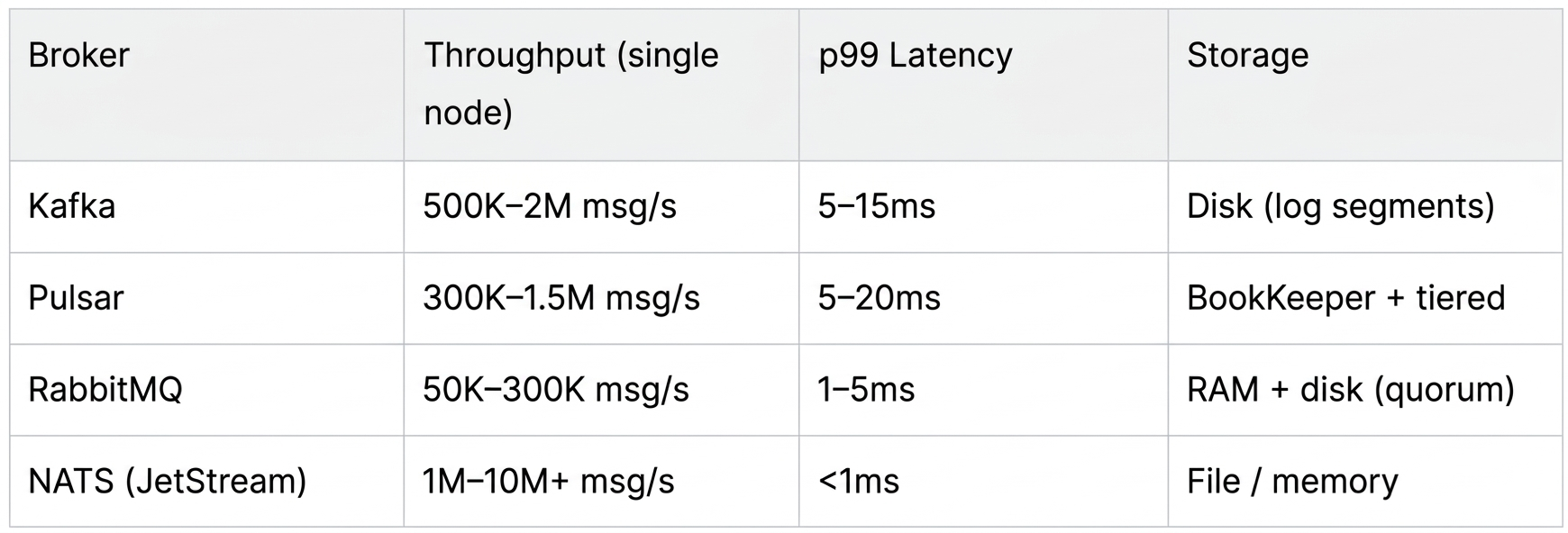
NATS's headline numbers are eye-catching, but compare carefully: NATS core (no persistence) is exceptionally fast; JetStream adds fsync overhead similar to other durable brokers, though its Go runtime gives it a structural latency edge over the JVM-based alternatives.
Operational Complexity Summary
Kafka (KRaft mode, no ZooKeeper since 3.3+)
- Single binary, reasonably simple to operate standalone.
- Cluster sizing requires careful partition planning upfront , repartitioning is painful.
- Schema Registry (Confluent) is effectively mandatory for production.
- Monitoring: Kafka's JMX metrics are rich but verbose. JMXTrans + Prometheus exporter or Confluent Control Centre.
Pulsar
- ZooKeeper (or Oxia) + BookKeeper + Pulsar brokers = three layers to operate.
- Managed offerings (StreamNative, DataStax Astra) are worth considering if self-hosted overhead is a concern.
- Monitoring: Prometheus + Grafana dashboards are excellent and maintained by the community.
RabbitMQ
- Single Erlang/OTP process , the simplest of the four to operate.
- Quorum queues (Raft) require a 3-node cluster for HA.
- Monitoring: Built-in management plugin is production-grade. Prometheus plugin ships with the standard image.
NATS
- Single Go binary (~20MB), zero external dependencies. Arguably the easiest broker to operate at any scale.
- JetStream clustering uses Raft internally , a 3-node cluster is sufficient for HA.
- Leaf node topology enables edge deployments without extra infrastructure.
- Monitoring: Built-in HTTP monitoring (
/varz,/jsz,/connz). Prometheus exporter available. Grafana dashboards maintained by Synadia.
Final Recommendation
Start with this decision tree:
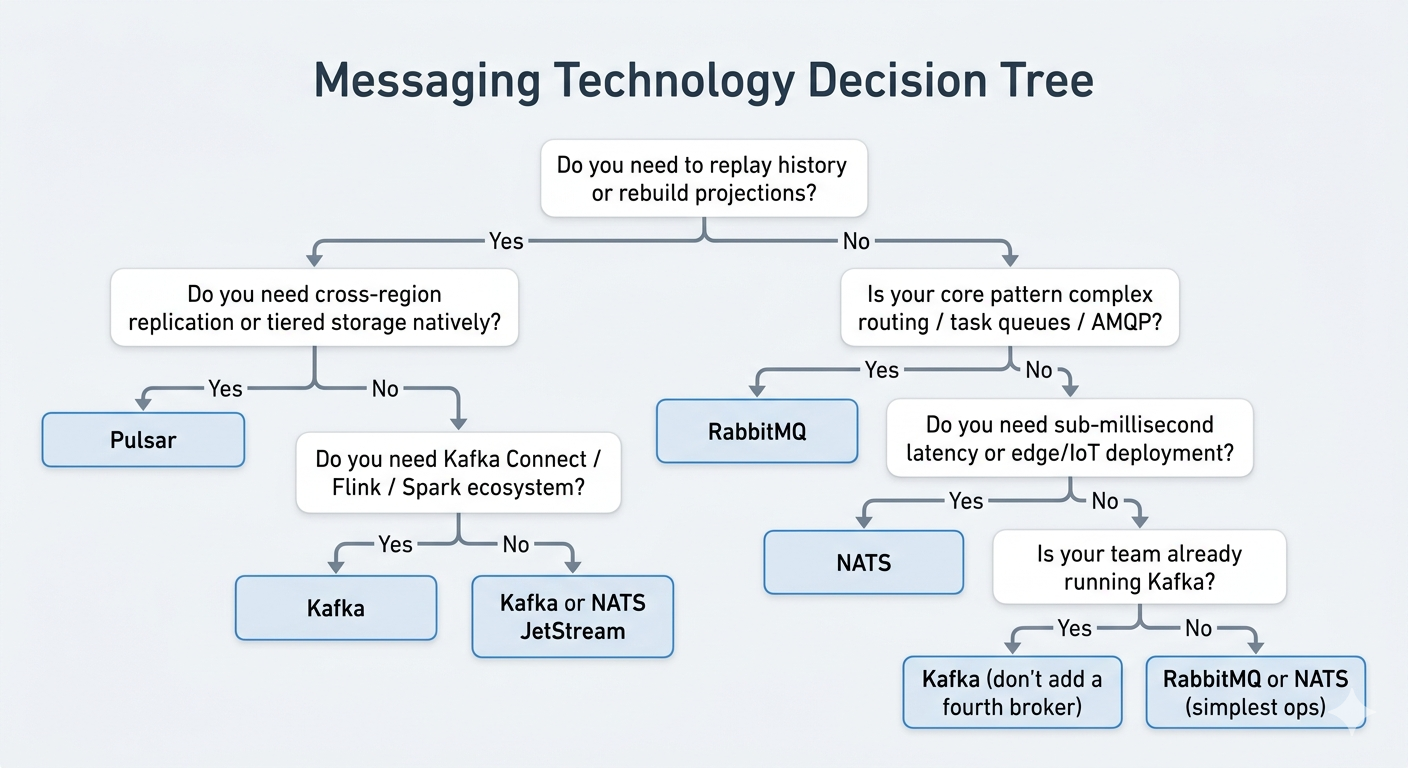
There is no wrong answer here , all four are production-proven at scale. The wrong answer is choosing based on hype rather than fit.
Run the Docker Compose examples, write a simple producer/consumer for your specific message shape, and benchmark against your actual throughput requirements before committing.
We have everything ready to deploy for evaluation here.
Let’s Build Together
Selecting the right message broker is a foundational decision that impacts your infrastructure for years. If you want to discuss your specific needs or require expert assistance with 24/7 operations, feel free to get in touch. We’re here to help you navigate the complexity and keep your systems running smoothly.