Introduction
In the dark ages, we didn't build a cluster by going to a cloud console and selecting how many servers of what size we wanted. We dealt with physical servers, and it was a long and tedious process, though quite fun at times. It usually involved raising a purchase order, waiting for the hardware to be delivered, and then taking it to the data centre to rack it.
Those two words survived the move to the cloud, and they survived it inside Apache Cassandra, where they still decide where every copy of your data lives.
A rack is a failure domain, not just a metal cabinet
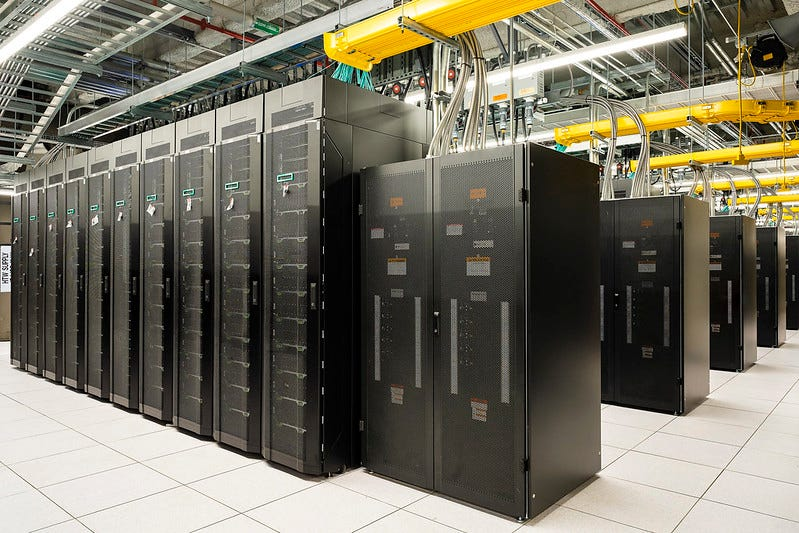
A data centre is a large building, often on the outskirts of a city, that hosts server computers. These buildings, frequently described as ugly, are built as fortresses, with secure access, specialised installations for the huge amount of energy they need for running and cooling the servers, and very fast internet links.
Inside a data centre you'll find lots of racks. A data centre rack is a standardised metal frame or enclosed cabinet (you'll very often see the word cabinet used instead) that houses servers, network switches and routers. A well set up rack has its own allocated network switch and power supply, and that detail is the whole point of everything that follows. A rack is the unit of infrastructure that fails as one piece.
You spread hardware across racks and sites because everything eventually fails
What the purchasing story above leaves out is that the process is intentionally repeated across multiple data centres and racks, to improve resilience and availability.
When designing infrastructure, you should always assume that hardware, racks, network equipment and even entire data centres can go up in flames. Rather than building for perfect operation, you build for failure.
Say you wanted to deploy a web application and bought nine servers. Instead of placing all nine in the same location, you distribute them across three data centres, three servers in each. Within each data centre, those servers are spread across different racks, one server per rack.
That distribution changes what a failure costs you. If a single server fails, the rest continue serving traffic. If an entire rack loses power or network connectivity, only one server is affected. Even in the unlikely event of a complete data centre outage, the application remains available from the other two locations. The goal is not to prevent every failure, but to design systems that tolerate failure without disrupting users.
Cassandra places replicas by rack, but only if you tell it where nodes live
All of this is rather abstract until you see a database doing it, and Apache Cassandra is a good one to look at, because racks and data centres are not an afterthought bolted on later. They are part of how it decides where your data lives.
Cassandra stores every row on more than one node. How many copies is up to you, and you set it per keyspace with the replication factor. A replication factor of 3 is what most people run in production. The catch is the same one from the last section: three copies are only useful if the three nodes holding them can't all die at the same time. Put them in the same cabinet, behind the same switch, and you have three copies of your data and one point of failure.
Cassandra avoids this if, and only if, you tell it where your nodes actually are.
Step 1: declare each node's data centre and rack
Each node declares its data centre and rack in cassandra-rackdc.properties:
# cassandra-rackdc.properties
dc=london
rack=rack1
For this to be used, you need a topology-aware snitch in cassandra.yaml. In almost every case that means:
# cassandra.yaml
endpoint_snitch: GossipingPropertyFileSnitch
Nodes then gossip their location to the rest of the cluster, and you can see the result straight away with nodetool status, which prints a rack column next to each node. If everything says rack1, you have some work to do.
Step 2: use NetworkTopologyStrategy on every keyspace
The keyspace then has to be told to use that topology, which is what NetworkTopologyStrategy does:
-- three copies in london, one per rack
CREATE KEYSPACE myapp WITH replication = {
  'class': 'NetworkTopologyStrategy',
  'london': 3
};
With that in place, Cassandra walks the token ring looking for the nodes that own the data and skips any node in a rack it has already used. With three racks and a replication factor of 3, each copy ends up in a different rack. Lose a rack and you still have two copies, which is enough to keep serving reads and writes at QUORUM.
If you are still on SimpleStrategy, none of this happens. It ignores racks and data centres completely and simply takes the next nodes around the ring. It is fine on a laptop and a liability anywhere else.
Step 3: keep the same number of nodes in every rack
This is where I see most clusters get into trouble. Cassandra spreads replicas across racks, but it does nothing to balance the amount of data each rack ends up with. The rule I stick to is simple: have as many racks as your replication factor, and put the same number of nodes in each one. Nine nodes, three racks, three nodes per rack. Twelve nodes, three racks, four per rack.
Get this wrong and the maths turns against you. A six-node cluster with four nodes in rack1 and one each in rack2 and rack3 still gives you one replica per rack, which sounds fine, except that the two lonely nodes now hold a full copy of the keyspace each, while the four nodes in rack1 share one between them. Those two nodes will run out of disk, run hot on compaction, and be blamed for a latency problem that is really a topology problem.
Two racks with a replication factor of 3 has the opposite issue. Cassandra runs out of distinct racks and has to double up, so one rack ends up with two of the three replicas. Lose that rack and QUORUM is gone.
One more thing worth knowing before you start: you can't simply edit the rack of a node that already holds data. Changing it changes what that node is supposed to own, and Cassandra will not sort it out for you. If you need to fix the topology of a live cluster, do it properly, by decommissioning and rebuilding nodes, or by building a new data centre with the correct layout and migrating to it. It is more work, but it is the only safe route.
Step 4: in the cloud, map a rack to an availability zone
The word rack is a leftover from the metal cabinets we talked about at the start, and Cassandra doesn't care what it means. It is a label for a failure domain, nothing more. Nodes sharing a label are assumed to fail together, so the only question is which boundary you consider a failure domain on your platform.
| Platform | Failure domain to use | Example |
|---|---|---|
| Physical data centre | The rack itself: separate cabinet, power feed and switch | rack=rack1 |
| AWS | Availability Zone | rack=eu-west-1a |
| GCP | Zone | rack=europe-west2-b |
| Azure | Availability Zone | rack=uksouth-2 |
| Kubernetes | The node's topology.kubernetes.io/zone label. K8ssandra and cass-operator map this for you, which is what you want given pods move around | rack=eu-west-1a |
You may come across Ec2Snitch and GoogleCloudSnitch in older documentation. They do the same job by asking the cloud metadata service, but I'd still recommend GossipingPropertyFileSnitch everywhere. One snitch across your estate, one file to look at when something is wrong, and it behaves the same whether the node is in Frankfurt or in a cupboard in Slough.
Step 5: add a second data centre and set LOCAL_QUORUM
Racks protect you inside one location. Data centres are how Cassandra protects you against losing the whole location, and this is where it is genuinely nicer to work with than most databases, because a second data centre is just another entry in the keyspace definition:
-- six copies in total, three per site, each in its own rack
ALTER KEYSPACE myapp WITH replication = {
  'class': 'NetworkTopologyStrategy',
  'london': 3,
  'dublin': 3
};
You now have six copies of every row, three in each site, each one in its own rack. Cassandra replicates between the two sites asynchronously, so the write is acknowledged as soon as your local consistency level is satisfied and the remote copies follow behind. Losing London entirely means Dublin carries on with a full copy of the data.
The important part is the consistency level your application uses. Use LOCAL_QUORUM, not QUORUM. LOCAL_QUORUM counts replicas in the data centre the client is connected to, so latency stays local and the link between sites never sits in your write path. QUORUM counts across the whole cluster, which quietly drags a round trip to Dublin into every query and makes your application hostage to a link you don't control. Set the local data centre in the driver as well, so clients talk to their nearest nodes rather than round-robin across the Irish Sea.
Data centres are not only about geography, either. A very common pattern is a second logical DC in the same location for analytics, so the Spark jobs hammering the cluster all night run against their own nodes and leave the ones serving your customers alone. Same cluster, same data, separate hardware, and the noisy workload can't take production down with it.
Four topology mistakes that show up as something else entirely
Topology problems rarely arrive labelled as topology problems. These are the four that account for most of what we see:
| Mistake | How it shows up |
|---|---|
Keyspaces left on SimpleStrategy | Racks and data centres are ignored completely; replicas are just the next nodes around the ring, so all three can land in one failure domain. |
| Uneven node counts per rack | The under-populated racks hold a disproportionate share of the data, causing disk pressure and hot compaction on a couple of nodes, diagnosed as a latency bug. |
| Two racks with a replication factor of 3 | Cassandra runs out of distinct racks and doubles up, putting two replicas in one rack. Lose it and QUORUM is gone. |
Using QUORUM across data centres | Every query drags a cross-site round trip into the write path, tying application latency to a network link you don't control. |
Where to start
If I had to reduce all of this to a few lines:
- Tell Cassandra where your nodes actually live, with
GossipingPropertyFileSnitchandcassandra-rackdc.properties. - Use
NetworkTopologyStrategyon every keyspace. - Keep as many racks as your replication factor, with the same number of nodes in each.
- Treat an Availability Zone as a rack in the cloud.
- Add a second data centre, and use
LOCAL_QUORUM, when losing a site is not an option.
None of it is difficult. It is a handful of lines of configuration, most of it decided before the first node ever starts, which is precisely why it is worth getting right at the beginning. Topology mistakes rarely announce themselves on the day you make them. They wait, quietly, until the afternoon a rack goes dark and somebody discovers that all three replicas were in it.
I, for one, welcome our new robot overlords.