
Introduction
DataStax Astra DB is an attractive starting point for many Cassandra workloads. Its serverless model eliminates infrastructure management, and the platform handles scaling, patching, and availability out of the box. For an application platform ingesting millions of events and data points per day from thousands of connected sources, Astra can deliver rapid time-to-value.
However, as data volumes grow and architecture matures, the economics and operational constraints of a fully managed Database-as-a-Service can start working against the organisation. This guide walks through a proven migration path from Astra DB to self-managed Apache Cassandra - the tooling involved, a zero-downtime strategy, and the benefits realised on the other side.
Why Move??
Unpredictable and Escalating Costs
Astra DB uses a consumption-based pricing model built around Read Request Units (RRUs) and Write Request Units (WRUs). A single read returning up to 4 KB counts as one RRU; a write of up to 1 KB counts as one WRU. The model is straightforward on the surface, but there are a few nuances worth understanding before committing at scale:
- Reads are billed on the amount of data scanned, not just what's returned. A query that touches 50 KB before filtering down to 4 KB is charged accordingly.
- Logged batch writes carry additional WRU overhead.
- Multi-region deployments add per-region write charges and cross-region data transfer costs.
- Storage billing is calculated against peak usage for the month, inclusive of indexes and metadata.
None of this is unusual for a managed service - consumption pricing is designed to make it easy to get started, and for many workloads it's a perfectly reasonable trade-off. Where it becomes worth pausing is at higher scale, particularly with write-heavy applications pushing frequent updates across many tables and keyspaces. At that point, per-unit costs can compound in ways that make monthly bills harder to forecast.
Self-managed Cassandra shifts the cost model entirely. Infrastructure costs, compute, storage and network are fixed and predictable. Paying for capacity rather than individual operations tends to offer better unit economics once throughput reaches a certain level.
Networking Constraints and Private Connectivity Complexity
Connecting to Astra DB from within a private cloud network requires private endpoints - AWS PrivateLink, Azure Private Link, or Google Cloud Private Service Connect, depending on the provider. The DataStax documentation states:
"All communication remains within the private network, ensuring that no information is transmitted over the public internet."
That is the goal, but reaching it is non-trivial:
- Private endpoints are a premium feature, available only on paid subscription plans.
- Endpoints must be in the same region and cloud provider as the Astra database. A database in a specific region can only use private endpoints in that same region. Multi-region databases require separate private endpoint configurations per region.
- DNS configuration is manual - private DNS entries must be created for
*.astra.datastax.comsubdomains, mapping both thedbandappsendpoints for each database ID and region. - Third-party open-source drivers are not officially supported over private links, which limits flexibility.
- Deletion requires cleanup on both sides - removing a private endpoint means deleting it from Astra and the cloud provider, then cleaning up DNS records.
For each cloud provider, the setup pattern differs:
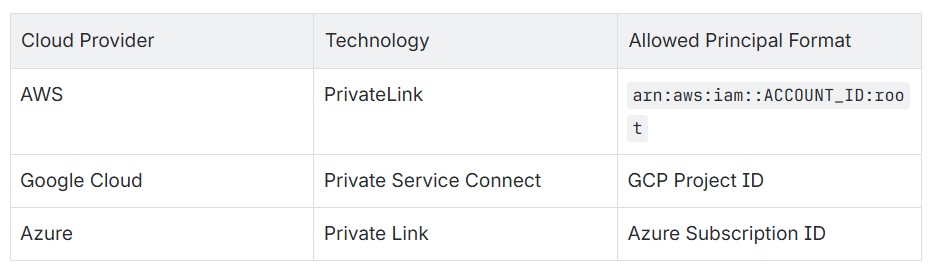
Contrast this with self-managed Cassandra running inside a private VPC/VNet. There are no extra peering steps, no premium features to unlock, no manual DNS zones to maintain. Application nodes talk directly to Cassandra nodes over the private network - the same way they talk to any other internal service.
Operational Control
With Astra, there is no control over compaction strategies, garbage collection tuning, or node topology. Inspecting sstables, running nodetool commands, or tuning JVM parameters is not possible. When performance questions arise, visibility is limited to what the Astra dashboard exposes.
Self-managed Cassandra provides full observability and tuning control. Schemas can use NetworkTopologyStrategy with a chosen replication factor, and compaction strategies like UnifiedCompactionStrategy can be selected to match the workload - settings that are chosen deliberately, not inherited.
The Migration Strategy
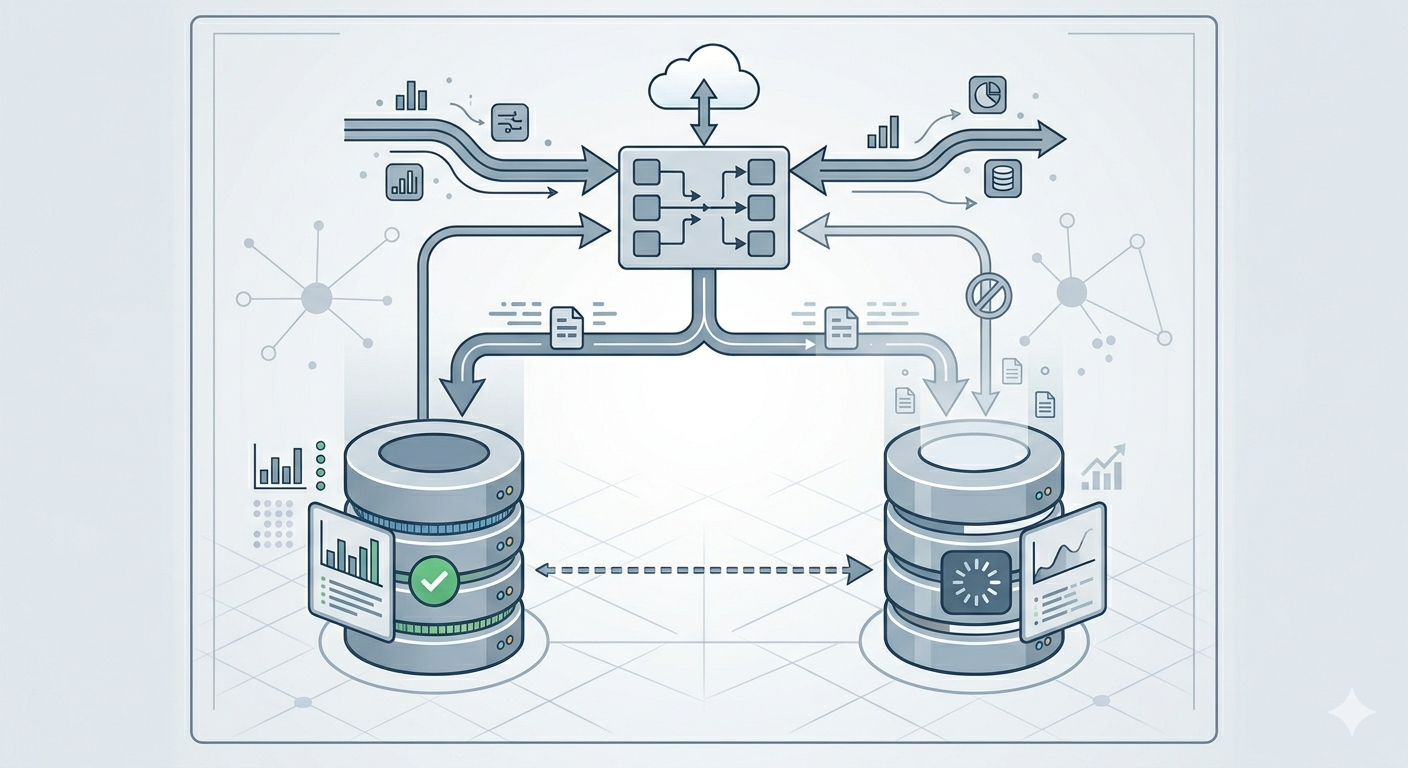
This migration follows a three-phase approach: ZDM Proxy setup for live dual-writing, bulk historical migration with DSBulk, and cutover with validation.
Phase 1: Zero-Downtime Dual-Writing with ZDM Proxy
The first step is to deploy the Zero Downtime Migration (ZDM) Proxy so that all new writes are captured on both clusters from the start, preventing any data gap during the bulk migration.
ZDM Proxy is an open-source tool from DataStax that sits between the application and both Cassandra clusters. It:
- Dual-writes every mutation to both the origin (Astra) and target (self-managed Cassandra)
- Routes reads to either cluster based on configuration (
read_mode) - Speaks native CQL protocol, so applications connect to it as if it were a normal Cassandra node
The ZDM Proxy deployment can be fully automated with Ansible:
- TLS certificates deployed for encrypted proxy-to-client communication
- Astra Secure Connect Bundle deployed for the origin connection
- Target CA certificate deployed for SSL connections to self-managed Cassandra
- Proxy configuration templated from variables:
1# Origin: Astra DB
2origin_username: "token"
3origin_password: "<astra_token>"
4origin_secure_connect_bundle_path: "/path/to/scb.zip"
5
6# Target: Self-managed Cassandra
7target_username: "cassandra"
8target_password: "<password>"
9target_contact_points: "10.x.x.x"
10target_port: 9042
11target_tls_server_ca_path: "/path/to/ca.crt"
12
13# Proxy behavior
14primary_cluster: ORIGIN    # Initially reads from Astra
15read_mode: PRIMARY_ONLY
The proxy runs as a systemd service with automatic restart on failure. Applications are reconfigured to point at the proxy endpoints instead of directly at Astra. At this point, all new writes flow to both clusters while reads continue from the origin (Astra).
Phase 2: Bulk Historical Data Migration with DSBulk
With ZDM Proxy capturing all live writes, the next step is to backfill historical data into the target cluster using DataStax Bulk Loader (DSBulk) - a command-line tool designed for high-performance data loading and unloading with Cassandra-compatible databases. It supports three core operations:
unload- exports data from a Cassandra table to CSV or JSON filesload- imports data from CSV or JSON files into a Cassandra tablecount- counts rows in a table (useful for validation)
This is where the complex part of the migration starts.
Some lessons learnt:
- Choose the correct size of dsbulk instance to handle the amount of data being transferred to you self-managed Cassandra
- Choose the correct size for your Cassandra instances to handle the writes of the dsbulk load command.
- Tune your Cassandra cluster to be write tolerant and optimised while the bulk migration is happening.
DSBulk connects to Astra DB using a Secure Connect Bundle (SCB) - a zip file containing TLS certificates, connection metadata, and endpoint information. This is specified with the -b flag. For self-managed Cassandra, it connects using standard host/port with configurable SSL and authentication.
The Migration Script
1# Unload from Astra (using Secure Connect Bundle)
2dsbulk unload \
3  -k "my_keyspace" -t "my_table" \
4  -b "/path/to/secure-connect-bundle.zip" \
5  -u "token" -p "$ASTRA_TOKEN" \
6  -url "/dump/my_keyspace/my_table" \
7  -header true -c csv \
8  --schema.preserveTimestamp true \
9  --schema.preserveTtl true \
10  --connector.csv.compression gzip
11
12# Load into self-managed Cassandra (over SSL)
13dsbulk load \
14  -k "my_keyspace" -t "my_table" \
15  -url "/dump/my_keyspace/my_table" \
16  -h "10.x.x.x" -port 9042 \
17  -u "cassandra" -p "$CASS_PASSWORD" \
18  -header true -c csv \
19  --schema.preserveTimestamp true \
20  --schema.preserveTtl true \
21  --connector.csv.compression gzip \
22  --driver.advanced.ssl-engine-factory.class DefaultSslEngineFactory \
23  --driver.advanced.ssl-engine-factory.truststore-path "/path/to/truststore.jks"
Key design decisions:
--schema.preserveTimestamp trueand--schema.preserveTtl trueensure that cell-level write timestamps and TTLs are faithfully reproduced on the target. Without these flags, all data would appear as if it were written at migration time, breaking TTL-based expiration and potentially causing issues with conflict resolution. Because ZDM Proxy is already dual-writing, any rows written during the bulk migration are safely deduplicated by Cassandra's last-write-wins semantics using the preserved timestamps.--connector.csv.compression gzipreduces intermediate disk usage substantially - important when migrating dozens of tables.--connector.csv.maxCharsPerColumn 65536handles large text columns (serialized objects, large text fields, etc.) without truncation.
Validation with dsbulk count
After the bulk migration, a separate validation script can be executed using dsbulk count on both clusters for a keyspace and table which then displays the results side-by-side:
1TABLE                                 SOURCE (Astra)   TARGET (Self-Hosted)
2-----                                 --------------   --------------------
3my_keyspace.events                    12,847,291       12,847,291
This provides confidence that the bulk migration is complete and accurate before moving to the next phase.
During the dual-write phase, read_mode is progressively shifted to validate that the target cluster returns consistent results. Once confirmed, primary_cluster is switched to TARGET to make the self-managed cluster authoritative.
Phase 3: Cutover
Once data consistency and performance parity are confirmed:
- Fine tune the self-managed Cassandra cluster to be read and write optimised. In Phase 2 it was write optimised.
- Switch
primary_clustertoTARGET - Monitor for a soak period
- Point applications directly at the self-managed Cassandra cluster
- Decommission ZDM Proxy nodes
- Terminate the Astra DB databases
Benefits of Self-Managed Cassandra

Cost Predictability and Reduction
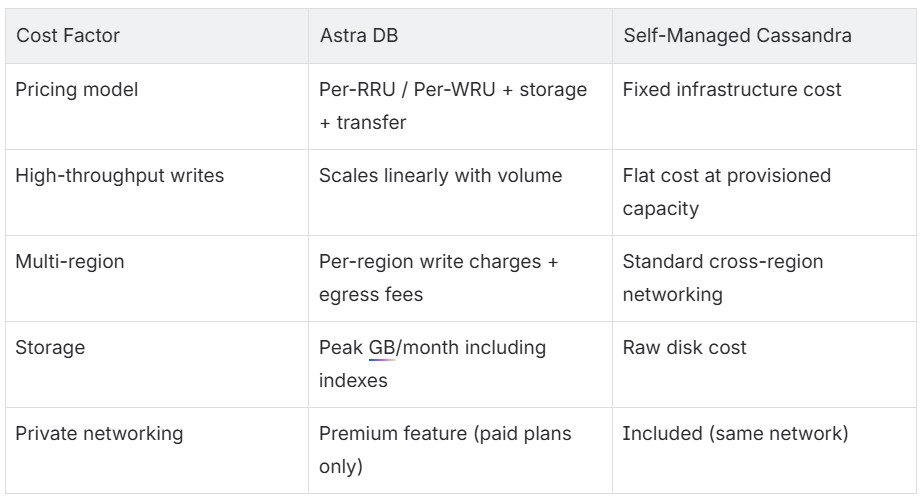
For write-heavy workloads, the savings are substantial. Ingesting millions of events daily at a per-write cost becomes untenable. With self-managed Cassandra, adding more write throughput means adding nodes - a one-time capacity investment rather than an ever-growing variable cost.
Simplified Networking
No more private endpoints, no per-region PrivateLink/Private Service Connect configuration, no manual DNS zones for *.astra.datastax.com. Cassandra nodes live in the same VPC/VNet as the application. Firewall rules and security groups are all that is needed.
Full Operational Control
- Compaction tuning - select
UnifiedCompactionStrategyor any other strategy to match the workload profile - JVM and OS-level tuning - GC settings, memory allocation, disk I/O scheduling
- Observability - full access to
nodetool, JMX metrics, system tables, and sstable-level inspection - Repair and backup - run repairs on a chosen schedule, take snapshots on demand
- Topology decisions - rack-aware placement, datacenter naming, replication strategies
Cloud Portability
An Ansible-based deployment works on any cloud provider (or on-premises) that offers Linux VMs. There is no lock-in to Astra's supported regions or cloud providers. Running in a region Astra does not serve, or moving between clouds, becomes an infrastructure exercise - not a vendor negotiation.
Data Sovereignty
All data resides on controlled infrastructure, in chosen regions. There is no intermediary platform holding the data, no third-party access to manage, and no external vendor in the compliance scope beyond the cloud provider itself.
Key Considerations
- Hardware sizing. When doing a migration it is highly important to scale the hardware to allow the volume of throughput needed to run the dsbulk migrations. If your hardware is not sufficiently provisioned you can run into scenarios where you get Out of Memory exceptions or really long migration times, purely because the hardware cannot handle the dsbulk loads.
- Preserve timestamps and TTLs during migration. Without
--schema.preserveTimestampand--schema.preserveTtl, the target cluster has no fidelity to the original write times. This breaks TTL expiration and can cause subtle data inconsistencies. - Validate with row counts, but do not stop there.
dsbulk countis a good sanity check, but also spot-check specific partition keys to verify data integrity at the cell level. - ZDM Proxy is the key to zero-downtime cutover. It eliminates the need for application-level dual-write logic and enables migration at the infrastructure layer, invisible to application code.
- Automate everything. DSBulk scripts, ZDM Proxy deployment, Cassandra cluster provisioning, and validation tooling should all be scripted and version-controlled. This makes the migration repeatable across environments (test, then production).
- Clean up as the migration progresses. Migrating dozens of tables generates a lot of intermediate data. Deleting dump files after each successful table load prevents disk pressure on the migration host.
Conclusion
Astra DB serves well during early growth phases, but the economics of a consumption-based managed service do not scale linearly with a high-throughput workload. Migrating to self-managed Cassandra delivers cost predictability, simplified network architecture, and full control of the data layer - all achievable without a single second of downtime.
The combination of DSBulk for historical data migration, ZDM Proxy for live dual-writing, and Ansible for infrastructure automation makes this a repeatable, low-risk operation. For any organisation running a write-heavy Cassandra workload on Astra and watching the bill climb, the path to self-managed is well-trodden and well-tooled.
For any assistance book a call with one of the specialists at Digitalis.io were we can guide you towards a succesful migration.